Thursday, March 31, 2011

Are you responsible for what your employees do online?

Search Engine People Blog

mad-dog-mishaved

How much control and subsequently liability do employees have when it comes to the online actions of their staff?

It’s quite a grey area, as most employees will also have their own personal accounts (email, blog, Twitter, Facebook etc) as well as the company owned ones. It’s pretty impossible for an employer to try to monitor and control all this activity.

Prevention

It’s impossible to prevent a member of your team from committing an online mistake or offence but you can do everything possible to encourage them to behave appropriately when using the internet at work.

A robust communication policy covering internet usage should always be put into place and any new starters made aware of the expectations. Alongside this policy, an agreement to adhere to these guidelines should be written into the contracts of all staff.

Protection

Professional indemnity insurance is designed to cover you for negligence claims made against you. For example, if an employee leaks a confidential piece of information online that subsequently loses a client money – you could face legal action and a compensation claim. Equally, if someone negligently and unwittingly breaches confidentiality or copyright online, your professional indemnity cover might come in very handy.

If you’re heavily reliant on the web and online systems, a specialist cyber insurance policy (or e-risks cover) can help protect you financially against a whole range of online eventualities. For example, if you unknowingly transmitted a virus to a third party system, you may have to pay the cost of the damage.

Controversial or confidential material has the potential to spread and ‘go viral’ overnight. With that in mind, you may feel you need some kind of ‘crisis containment’ cover. This type of insurance could help cover the cost of expert public relations consultants, should you need to mitigate a crisis, manage media attention and uphold your public image.

Warning on Fines & Penalties

It’s worth noting that any fines and penalties received as a result of online activity normally aren't covered under any insurance policy. Malicious online acts or failure to take necessary security precautions usually falls outside of your cover.

What's the one thing in your experience new business owners should do to keep their business legally "safe" on the Internet?

Post from: Search Engine People SEO Blog

Are you responsible for what your employees do online?

Wednesday, March 30, 2011

Actionable SEO in 10 Minutes

Search Engine People Blog

10 minutes… no seriously, time it. Here we go:

Keyword Research (4 Minutes)

Pick the keyword or phrase you believe most customers will search when they are interested in your product.

A professional would be able to find a number of these keywords and phrases and determine exactly what sells and what does not, but in the meantime you can make an educated guess.

To make these educated guesses, go to Google and search for the product or service you want to optimize for. We will use a mock online camera store as an example. The page I'm optimizing is my Nikon D90 Camera page. On this page I am attempting to sell this Nikon D90 digital camera.

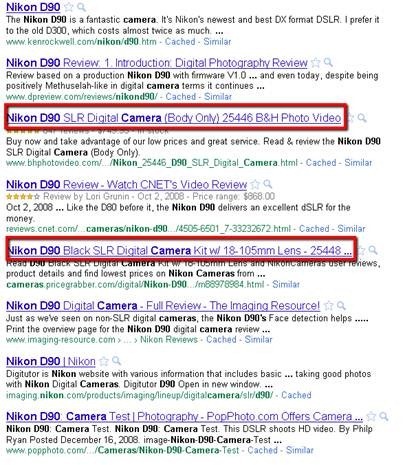
I would go to Google and simply type in Nikon D90 and press “Search”…I would see a screen like this:

clip_image002

See those I highlighted? In most cases these are the <title> tags of your top competitors. There are many reasons why these sites are on the top, but one of those reasons are their Title Tags. The words used in these tags often represent the keywords your main competition is targeting on that particular page for that particular product or service. This is not an exact science – but in many cases these competitors have done their keyword research homework and uncovered the phrases people search for most when looking for that product and service.

Let’s look at bhphotovideo.com’s title tag for the Nikon D90 Camera:

Nikon D90 SLR Digital Camera (Body Only) 25446 B&H Photo Video

They made sure to mention (of course) Nikon D90, SLR Digital Camera, Body Only (Since there are similar models that comes with lenses), and a number: 25446. This number is likely a stock number from Nikon that searchers use when looking for this camera.

What did we just accomplish? We just “borrowed” some of their valuable research and will now use it on our page!

  1. <title> tag optimization (3 Minutes)

Let’s build your Title tag for this Nikon D90 page.

As a rule of thumb keep your title tag to 60 characters or less (including spaces). Using our research from step 1 – my title tag might look like:

Nikon D90 (Body Only) 25446 SLR Digital Camera – My Camera Store Name

If you looked at almost all of the results above, the words Nikon D90 were used first in the Title tags of the top 10 sites. As a rule: put the most important keywords first!

Content optimization (3 Minutes)

Using the keywords mentioned above throughout the body content of your page is also an important factor.

Best practice is to simply sprinkle your keywords throughout the content where they fit naturally. Make sure it makes sense ! It doesn’t matter how many people visit your page if it doesn’t make any sense once they get there.

Just  casually insert the words into the text .

That’s it. Now rinse and repeat for every other page on your website! 10 minutes and you will have better SEO – at least better on page SEO and this can be a huge boost to your business.

What simple processes have you put in place to move your site forward, even by little bits? Share them in the comments!

Post from: Search Engine People SEO Blog

Copyscape: Duplicate Content Checker

Secret Women's Business Network

Have you found other people online passing off your content as their own? Have you wondered how to check that your rewritten articles and PLR content (Private Label Rights) is unique?

This week’s Cool Tool solves both those problems.

Copyscape is a duplicate content checker that enables you to check the Internet for matching articles and blog posts. This video tells you a little bit more about it and how to use it:

As you can see, you can use Copyscape in a number of ways: batch searches, to check multiple pages as often as needed; individual searches, to make sure your articles are unique; and comparing articles, which is especially useful if you have rewritten something and want to make sure it is different enough to the original for publishing.

Google Takes Social Search to the Next Level with +1

HubSpot's Inbound Internet Marketing Blog

Today, Google came out with a counter punch to Facebook's Like button. Earlier today, the search engine giant began rollling out a new button called +1. The +1 button will apear next to search engine results and AdWords advertisements. In the future, website owners and publishers will be able to add a +1 button to pages and articles on their sites.

How Google +1 Works

Google plus 1 resized 600

How does Google's new +1 work? First of all, +1 is currently being rolled out as an experiment and you need to opt in with Google to have access to it in the short term. In order to view +1 search results and AdWords results, the user will have to be logged in with their Google profile. Once a user is logged in and clicks on the +1 button next to a search engine result, Google we keep track of that +1 and highlight that search result if it appears for any of that user's friends for that or a similar search.

Check out a quick video from Google introducing +1:

A Real Step Towards Social Search

With +1 Google makes a major step forward in its quest for more social search results. Not only do the +1 recommendations play a significant role in Google's series of social search improvements, but they will also highlight content people are actively interested in. Now people using social search will be able to see content created and shared by those in their social network, and recommended by those in their Google +1 network. All of the +1 data, TechCrunch points out, will be available to the public likely through an API.

Google +1 Is a Social Network

google plus one resized 600

While +1's initial impact might be seen in social search results, it is important to realize that +1 is more than that; it is a social network. Google Profiles are at the core of Google's future plans for the discovery and sharing of contextual information. With the launch of +1, Google Profiles got much more useful because a new tab has been created in Google Profiles to let users keep track of all of their +1s.

Marketing Takeaway

It seems like Google keeps making changes and adding new tools that will impact how your business will get found online. Don't worry about understanding all of the details and granularity of every change Google makes. However, you should notice the patterns that are occuring with all of the changes Google is making. Clearly, Google is rewarding social businesses. The more your business connects with prospects and customers online, the more you increase your odds of getting found in Google's evolving search results.

The days of obsessing over keyword rank are over. Instead, make your business social and create relevant information that will help to attract +1s and influence who decides to visit your site from search engine results pages. Blogging and sharing content on social media has never been more important. In a world that is being built on personal recommendations, it is critical that your business becomes social through remarkable content.

What do you think about Google +1?

Live Webinar: State of the Social Media Marketing Industry

Live Webinar: State of the Social Media Marketing Industry

Join this webinar with Social Media Examiner to hear the results of a brand new study.

Learn the latest industry trends and insights compiled from 3300 social media marketers.

Tuesday, March 29, 2011

10 Office Pranks Perfect for April Fools’ Day

Mashable!


Ah, April Fools’ Day. That dreaded day of the year that news editors and the gullible public love to hate. While we can’t wait to see what amusing pranks the likes of Google are cooking up, you can plot your own fun in the meantime.

We’ve got 10 suggestions, ranging from vintage classics to more up-to-date tricks that you can play on your colleagues, friends and frenemies.

If your office has a good sense of humor and you’re looking for a bit of light-hearted, harmless fun this April 1, take a look through the gallery for our ideas and please share your own suggestions in the comments box below.


1. Speech Recognition


Create an official looking notice (as per the house style of your workplace) informing staff that an item of office equipment is now equipped with speech recognition technology. Add a few suggested commands. Stick the notice to the equipment. Sit back and watch your colleagues shout at an inanimate object. Secretly video the action for prolonged fun.


2. Crossed Wires


Simple, yet effective. Just switch the telephone plugs of your colleagues' phone lines (leaving their phones in exactly the same place) and enjoy the confusion as they repeatedly receive calls for each other. Works best with coworkers that aren't on the best terms to start with.


3. Quick Change


This one requires a little planning and collaboration, but the effect will be worth the effort. Arrange with coworkers to each bring in several changes of clothes. Then, throughout the morning repeatedly switch items of clothing. Ensure your mark sees you all in as many different items as you can manage. Wait for the other shoe to drop.


4. Fun with Mice


Anyone leaving their mouse unattended around April 1 deserves punishment. While the classic trick was to remove the mouse's tracker ball, nowadays you can achieve the same effect by putting some tape over the mouse's laser tracker. Alternatively, and if you can find time with an unattended computer, change the mouse's settings for maximum confusion.


5. Hunt the Paper Clip


This is another oldie-but-goldie for anyone in an office where a photocopier is still regularly used. Place a paper clip over or on a piece of blank paper and make several copies. Now, place them back on the top of the paper tray. Hang around to see your colleague's confusion as they desperately try and find the strange paper clip that's showing up on all their copies.


6. This Stall is Occupied


For this you'll need a pair of shoes, a pair of trousers, some newspaper (or something similar) for stuffing and possibly a step ladder. In a toilet stall with a gap at the bottom, set up your items of clothing to look as if someone is using the conveniences. Lock the stall (from the outside if possible, otherwise this is where the step ladder comes in) and leave your mystery "person" to confuse (and very possibly worry) restroom users for the rest of the day.


7. BSoD


This is perhaps more effective with older colleagues who are likely to have experienced the pain of the "Blue Screen of Death." For this prank, it's just a matter of finding an appropriate screen grab and either leaving it on your co-worker's display, or setting it as the screen saver for a nasty surprise.


8. Can You Hear That?


Find, or make a recording of a repetitive noise (a heart beat works well for maximum distress) or dig out a portable radio. Set the volume to just audible and hide it in a filing cabinet, cupboard, drawer, etc., near to your mark. Now wait for your colleague to ask if anyone else can hear that heart beat/static/music and prepare to deny all. Several times. A straight face is essential.


9. Wrong Number


Does your office issue a paper list of phone extensions? If so, there's fun to be had. You need to access the master doc (or re-create it if need be). Swap the extensions and then replace your target's list with the doctored version. Obviously you'll need to replicate any creases, edits, coffee stains and so on, but if you can pull this off, you're in for a treat as your unsuspecting mark blithely dials a work buddy and instead gets the MD.


10. Just Smirk it Out


Our last prank is especially effective if your colleagues are expecting you to pull some kind of stunt. This April Fools', just do nothing. Sit and smirk at everything on the morning of the 1st. They will rack their brains desperately trying to work out what you've plotted. You can help out their anxiety levels with loaded comments to match your smirk. "Enjoy your coffee." "Have you used the water cooler yet today?" "Aren't you going to answer that?"

Thumbnail image courtesy of iStockphoto, kutaytanir, gallery images courtesy of Flickr, Josh Derr, Kate, jrpinky_boi, Daniele Pieroni, jessi, Eric P, Josh Liba, Ren Adams, Martin Pettitt and Tricia

Tracking Offline Conversions for Local SEO

We have certainly seen a trend over the last one to two years where Google is focusing on more personalized search and an increasing focus on providing local results. As you know, a searcher does not even have to be burdened with entering a local modifier anymore.

Google will gladly figure out, for you, whether or not your search has local intent. :)

Google's Investment into Local

Late last year Google moved one of their prized executives over to local services, Marissa Mayer. Moving Mayer, fresh off Google Instant and a variety of other high profile areas of Google's search development, to head up local is a real strong reinforcement of how much attention Google is putting on local and local result quality (or perceived quality).

If you are a business owner who operates locally, say a real estate agent or insurance agent or really any other consumer-based service, then this presents a huge opportunity for you if you can harness the targeting and tracking ability available online.

Merging Offline Marketing with Online Marketing

A lot of small businesses or larger businesses that operate locally still rely quite a bit on offline advertising. It use to be that business owners had to rely on staff nailing down exactly how a lead came to them (newspaper ad? radio ad? special discount ad? and so on).

While it is still good practice to do that, relying solely on that to help gauge the ROI of your advertising campaign introduces a good amount of slippage and is not all that accurate (especially if you sell something online).

As local businesses start to see the light with SEO and PPC campaigns versus dropping 5 figures on phonebook advertising, a big selling point as a service provider or an in-house marketing staff member will be to sell the targeting of online campaigns as well as the tracking of those results.

If your a business owner, it's equally important that you understand what's available to you as an online marketer.

Types of Offline Advertising to Track

Locally, you are essentially looking at a few different types of advertising options to work into your new found zest for tracking results:

  • Radio
  • Television
  • Print
  • Billboards

Print is probably the most wide-ranging in terms of branches of advertising collateral because you can get into newspapers, magazines, flyers, brochures, banners, yellow pages, and so on.

While your approach may be different to each marketing type, the core tracking options are basically the same. You can track in your analytics program via:

  • Separate Domains
  • Custom URL's
  • Custom Phone Numbers

The beauty of web analytics, specifically a free service like Google Analytics, is that it puts the power of tracking into the hands of a business owner at no cost outside of perhaps a custom set up and implementation by a competent webmaster. All of these tracking methods can be tracked in Google Analytics as well as other robust analytic packages (Clicky.Com as an example, is a reasonably priced product which can do this as well, save for maybe the phone tracking).

Structuring Your Campaigns

With the amount of offline advertising many businesses do, it is easy to get carried away with separate domains, custom URL's, custom phone numbers, and the like.

What I usually like to do is use a good old fashioned spreadsheet to track the specific advertisements that are running, the dates they are running, and the advertising medium they are using. I also include a column or three for the tracking method(s) used (custom URL, separate domain, special phone number).

In addition to this, Google Analytics offers annotations which you can use to note those advertising dates in your traffic graph area to help get an even better idea of the net traffic effect of a particular ad campaign.

How to Track It

Armed with your spreadsheet of ads to track and notes on how you are going to track them, you're ready to set up the technical side of things.

The tracking is designed to track the hits on your site via the methods mentioned, once they get there you'll want to get that traffic assigned to a campaign or a conversion funnel to determine how many of the people actually convert (if you are able to sell or convert the visitor online).

Custom URL's

A custom URL is going to be something like:

yoursite.com/save20 for an advert you might be offering 20% savings on
yoursite.com/summer for an advert you could offer a summer special on

You may or may not want to use redirection. You can use a redirect method if you are using something like a static site versus a CMS like Wordpress. With Wordpress, you could create those url's as specific pages and just no-index them and ensure they are not linked to internally so you keep them out of the search engine and the normal flow of navigation. This way you know any visit to that page is clearly related to that offline campaign.

A redirect would be helpful where the above is not possible and you need to use Google's URL builder to help track the campaign and not lose referral parameters on the 301.

So you could use the URL builder to get the following parameters if you were promoting a custom URL like yoursite.com/save20:

http://www.yoursite.com/savings.php?utm_source=save20&utm_medium=mail&utm_campaign=bigsave

Then you can head into your .htaccess file (Apache) and insert this code:

(should be contained on 1 line in your .htaccess file)

RewriteRule ^save20$ /savings.php?utm_source=save20&utm_medium=mail&utm_campaign=bigsave [L,R=301]

When you test, you should see those URL builder parameters on the landing page and then you know you are good to go :)

If you are worried about multiple duplicate pages getting indexed in the search results (with slightly different tracking codes) you can also leverage the rel=canonical tag on your landing page

<link rel="canonical" href="http://site.com/folder/page/" />

Separate Domains

Some companies use separate domains to track different campaigns. The idea is the same as is the basic code implementation with exception that you apply any redirect to the domain rather than a sub-page or directory off the domain as we did in the prior example.

So you sell snapping turtles (snappingturtles.com) and maybe you sell turtle insurance so you buy turtleinsurance.com and you want to use that as a part of a large campaign to promote this new and innovative product. You could get this from the url builder:

http://www.snappingturtles.com/?utm_source=national&utm_medium=all&utm_campaign=turtleinsurance

The .htaccess on turtleinsurance.com would look like:

(should be contained on 1 line in your .htaccess file)

RewriteRule .* http://www.snappingturtles.com/?utm_source=national&utm_medium=all&utm_campaign=turtleinsurance [L,R=301]

This would redirect you to the home page of your main site and you can update your .htaccess with a sub-page if you had such a page catering to that specific market.

Custom Phone Numbers

There are quite a few ways to get cheap virtual numbers these days and Phone.com is reliable service where you can get a number for roughly $4.88 per month.

I know companies that implemented custom numbers for a bunch of print ads and it was pretty eye-opening in terms of which as performed better than others and how much money is wasted on untargeted print campaigns.

There certainly is a somewhat intangible brand equity building component to offline ads but it is still interesting to see ads which carry their weight with traffic and response rates, as well as being really helpful when it comes time to reshape the budget.

Here are a couple handfuls of providers which offer phone tracking inside of Google Analytics. Most of these providers will require the purchase of a number from them to tie into a specific URL on your site or just right into the domain + help track those calls alongside the pageviews generated.

Some campaigns are wide-ranging enough to where you may want to target them with a custom number or two and a custom URL or domain. Using a spreadsheet to track these measures along with using Google Analytics annotations to gauge traffic spikes and drops offers business owners deep view into the use of their marketing dollars.

Custom Coupon Codes

If you run a coupon code through Groupon you of course know where it came from. But other channels are also becoming easier to track. Microsoft Office makes it easy to create & track custom coupon codes. There are even technologies to allow you to insert tracking details directly into coupon codes on your own website (similar to online tracking phone numbers via services like IfByPhone or Google's call tracking). Some online coupons offer sophisticated tracking options, and Google wants to get into mobile payments to offer another layer of customer tracking (including coupons).

Finding a Reputable Provider

If you are a business owner who thinks "wow this is awesome, how the heck do I do it?", well here is some advice. If the field of web analytics is mostly foreign to you I would suggest finding a certified Google Analytics provider or ask if your current web company can do this for you. Certainly there are plenty of competent people and companies that are not part of the Google Analytics partner program.

If you are interested in a Google Analytics partner you can search for them here. There is also quite a bit of information in the self-education section of Google Analytics.

I would recommend learning how to do this over a period of time so you can make minor or major changes yourself at some point. Also, it helps to establish a business relationship with someone competent and trustworthy for future tasks that may come up, which you cannot do on your own.

If you are a service provider, start implementing this for some of your local clients and you'll likely be well on your way to establishing yourself as a sought-after marketer in your area.

Acer Releases Dual-Screen Iconia “Touchbook”

TechCrunch

It is rare to find a device that is both baffling and compelling. We’ve been talking about the Acer Iconia for a while now and this dual-screened tablet or “Touchbook” is now available and shipping in the US next month. It runs a Core i5 chip, Windows 7, and has two 14-inch screens made of high-strength Gorilla Glass that allow for typing, multi-touch, and gestures.

Read more…

NBN Co to pay IBM $200m for operational infrastructure

network

National Broadband Network Co chief executive Mike Quigley today announced that the company was working on a deal with IBM worth $200 million to build the business and operations systems required to manage customers, billings and connection provisioning.

Quigley said the contract would pay out around $200m over a three year span, but the timetable for deployment has much of system done by early 2012.

NBN Co, as a wholesale company, will depend on telecoms retailers to sell bandwidth on the government’s $6 billion fibre-optic network, so a complicated operations system that gives third party retailers access to the information they need is important.

The company had originally intended to use turnkey technologies but turned to IBM when it became clear an operation of the NBN’s complexity required a custom solution.

Monday, March 28, 2011

13 Quirky iPhone Accessories [PICS]

Mashable!

Don’t just settle for standard issue accessories. We invite iPhone owners out there to take a walk on the fun side of the street with some downright silly accessories for your Apple mobile.

Whether it’s a stand with a witty design, a decal that evokes retro tech, or a case that will put a smile on your face, we’ve got 13 seriously cool and quirky companion products for your iPhone.

So, take a little look through our thoroughly light-hearted gallery and let us know in the comments below which items you think offer a refreshingly unusual take on the “iAccessory.”


1. Etch a Sketch iPhone Case


http://www.thinkgeek.com/gadgets/cellphone/e747/" TARGET="_blank">Etch a Sketch iPhone Case</a>" src="http://8.mshcdn.com/wp-content/gallery/fun-iphone-accessories/etch_a_sketch.jpg" width="400" style="border: none;" />


This case is made at the original Etch-a-Sketch factory. It's an interesting study into how companies evolve their products to suit the market, and also a fun case for your phone.

Cost: $24.99


2. iPlunger Phone Stand


http://www.fredflare.com/customer/product.php?productid=6417&cat=254" TARGET="_blank">iPlunger Phone Stand</a>" src="http://7.mshcdn.com/wp-content/gallery/fun-iphone-accessories/iplunger.jpg" width="400" style="border: none;" />

Sucker this little fella on to the back of your iPhone and it'll keep it upright -- no plumbing required.

Cost: $10


3. Arkhippo Case


http://www.arkwhat.com/13-arkwhat-" TARGET="_blank">Arkhippo Case</a>" src="http://9.mshcdn.com/wp-content/gallery/fun-iphone-accessories/arkhippo.jpg" width="400" style="border: none;" />

Described as "huge" and "easy to handle," the Arkhippo case adds some colorful heft to your iPhone with some well-padded protection, and a handy way to stand it up.

Cost: $24


4. Tape Cassette Decals


http://www.etsy.com/shop/Appledecalshop?section_id=7817250" TARGET="_blank">Tape Cassette Decals</a>" src="http://5.mshcdn.com/wp-content/gallery/fun-iphone-accessories/tape.jpg" width="400" style="border: none;" />

If you yearn for the days of the Walkman, this sticky tape cassette decal for your iPhone offers some handheld nostalgia.

Cost: $6.99


5. Appstand


http://www.thinkgeek.com/gadgets/cellphone/d6f4/" TARGET="_blank">Appstand</a>" src="http://5.mshcdn.com/wp-content/gallery/fun-iphone-accessories/appstand.jpg" width="400" style="border: none;" />

Complete with six different colored inserts, this clever stand frames your iPhone on your desk or bedside table. It's perfect for slideshows, alarm clock apps, watching media and more. Appstanding!

Cost: $24.99


6. Spiderpodium


http://www.firebox.com/product/2789/Spiderpodium?via=ser¤cy_conversion=1" TARGET="_blank">Spiderpodium</a>" src="http://6.mshcdn.com/wp-content/gallery/fun-iphone-accessories/spider.jpg" width="400" style="border: none;" />

The Spiderpodium is one way to keep arachnophobes away from your precious iProduct. The grippy octopod has -- you guessed it -- eight flexible legs as well as a hole in its body for feeding cables through.

Cost: $24


7. On Angel's Wings iPhone Holder


http://www.fredflare.com/customer/product.php?productid=6566&cat=254" TARGET="_blank">On Angel's Wings iPhone Holder</a>" src="http://8.mshcdn.com/wp-content/gallery/fun-iphone-accessories/wings.jpg" width="400" style="border: none;" />

Your iPhone can earn its wings with this whimsical stand that works in both portrait and landscape mode thanks to its removable sucker cup.

Cost: $12


8. GameBoy Skin


http://www.etsy.com/shop/Vinylstudio?section_id=7610059" TARGET="_blank">GameBoy Skin</a>" src="http://7.mshcdn.com/wp-content/gallery/fun-iphone-accessories/game-boy.jpg" width="400" style="border: none;" />

More retro-themed fun here with an unofficial GameBoy case for your fave handheld device.

Cost: $9.99


9. Little Black Book for iPhone


http://www.firebox.com/product/2926/Little-Black-Book-for-iPhone?via=ser¤cy_c... TARGET="_blank">Little Black Book for iPhone</a>" src="http://7.mshcdn.com/wp-content/gallery/fun-iphone-accessories/book.jpg" width="400" style="border: none;" />

Considering that the cellphone is the "little black book" of today, this case is certainly appropriate. With a sturdy wooden frame, this unusual case is crafted using traditional bookbinding techniques. It allows access to all ports and even boasts a suitably placed hole for the camera.

Cost: $64


10. The Mobile Phone Massif


https://www.facebook.com/pages/The-Mobile-Phone-Massif/153682794684141?v=wall... TARGET="_blank">The Mobile Phone Massif</a>" src="http://8.mshcdn.com/wp-content/gallery/fun-iphone-accessories/80sphone.jpg" width="400" style="border: none;" />

Do you hark back to the glory days of the 80s "brick" phones with fond memories? No, neither do we really, but we do find this case somewhat amusing.

Cost: $20


11. RetroFit TV iPhone Holder


http://www.fredflare.com/customer/product.php?productid=6969&cat=254" TARGET="_blank">RetroFit TV iPhone Holder</a>" src="http://4.mshcdn.com/wp-content/gallery/fun-iphone-accessories/retrofit.jpg" width="400" style="border: none;" />

This cardboard holder will turn your iPhone, or iPod touch, into a teeny vintage goggle box, perfect for watching old movies.

Cost: $7.95


12. Hold My Electronics


http://www.urbanoutfitters.com/urban/catalog/productdetail.jsp?id=19991512&am...,+product.marketingPriority" TARGET="_blank">Hold My Electronics</a>" src="http://5.mshcdn.com/wp-content/gallery/fun-iphone-accessories/holdmyeletronics.jpg" width="400" style="border: none;" />

Can we give you a hand? In fact, here's two to cradle your beloved device when yours are busy.

Cost: $20


13. Camera SigniCASE


http://www.etsy.com/shop/Signimade?ref=seller_info" TARGET="_blank">Camera SigniCASE</a>" src="http://9.mshcdn.com/wp-content/gallery/fun-iphone-accessories/camera.jpg" width="400" style="border: none;" />

Is your iPhone as much a compact camera as it is a portable telephone? Then show your love of iPhotography with this hand-crafted wooden case that's designed to look like a retro snapper.

Cost: $34.99

Saturday, March 26, 2011

Presentation Tools: Keynote vs. PowerPoint

Graphic and Web Design Blog - Inspiration, Resources and Tools

When we need to make a presentation, we often think about using Microsoft Powerpoint. Whether it’s presentations for school, work, home or party, Microsoft Powerpoint seems to be the only choice. But Powerpoint’s got a whole lot of competition: Google Presentation, Impress, Symphony, and its strongest rival, Keynote.

Some of you may have heard of Keynote, the Apple version equivalent of Powerpoint. Loyal Mac users have raved about it. It’s not as popular as Powerpoint, but has received rave reviews from many critics and designers. Which is better when it comes to performance–Microsoft’s Powerpoint or Apple’s Keynote? Let’s take it one aspect at a time.

1. Theme Designs

First of all, theme designs dictate the whole look of the presentation. The theme will set the tone for the whole presentation; whether it’s modern contemporary, old school traditional, minimalistic elegance or psychedelic pop art.

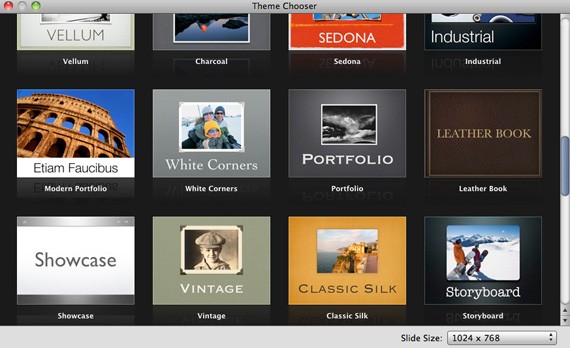
The basic theme designs offered by Keynote are without competition–genius in design and simply gorgeous with 44 standard themes. They are minimalist and cool, so Keynote won the contest both graphically and functionally. Of course, there are several free Powerpoint and Keynote templates for download online, so you won’t run out of choices when it comes to presentation templates.

Keynote Theme Designs

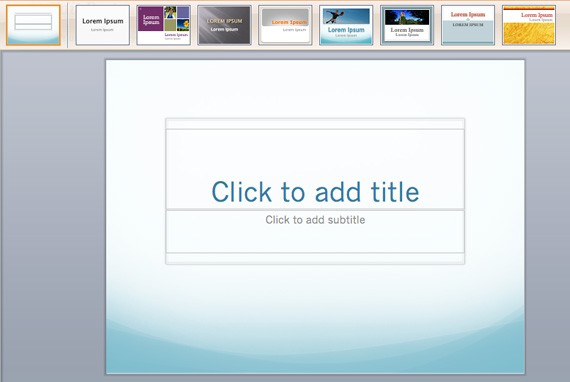
Powerpoint Theme Designs

Making a presentation with Keynote allows you to stand out–you’re going the extra mile, so you’re more professional and more memorable. Everyone else is content using Powerpoint for their presentations, but do you really want to be just like everyone else? A Keynote presentation is sure to impress your boss, employees and clients. Powerpoint is the norm, so your presentation can be forgettable.

2. Transition Effects

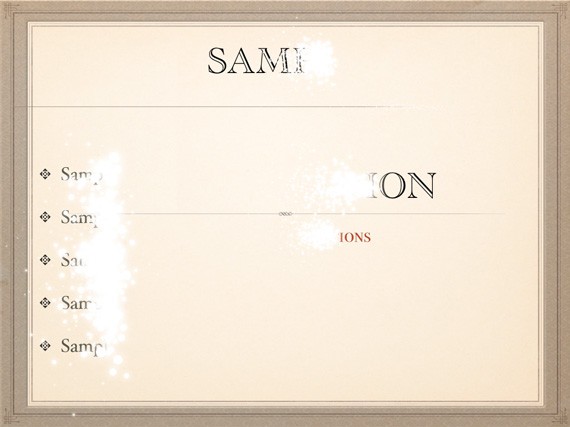
Both Powerpoint and Keynote have interesting transition effects. Dissolve, wipes, stripes and 3-D are just some of the transition effects from Powerpoint. Keynote has a lot more options, with interesting effects like Sparkle, Shimmer, Twist and Anagram. If you want a more professional transition, you can use Magic Move. Nothing is more annoying that seeing too many cheesy effects–just get to the point already. Keynote’s Magic Move is a sleek and smooth transition from one slide to another.

Sparkle Transition Effect from Keynote

Dissolve Transition Effect from Powerpoint

We won’t delve deeper with this because while these add dramatic effect to your presentation, we know it’s often not necessary and it’s the content that counts. Let us skip to the next aspect.

3. User Friendliness

Powerpoint is undoubtedly stable and reliable. And, more people are morefamiliar with it. So does it mean that Powerpoint is more user-friendly than Keynote? Maybe because it is familiar; but if you have been using Mac programs all your life, creating a presentation on Powerpoint can be hard–the interface is busy, too many features and buttons, it can be very easy to get lost.

For a beginner, Keynote tends to be more user-friendly than Powerpoint. Users will be able to create a more polished and professional presentation with Keynote than with the Microsoft program. It is versatile, smooth and accessible for any skill level.

4. Graphics

When it comes to graphic quality and typography, Keynote is still superior. It just retains the elegance and minimalist design that is characteristically Apple.

Graphs from Keynote

Graphics by Powerpoint

A unique and extra helpful feature of Keynote is that it supports alpha transparency. You can pull an image and get rid of the background, making it look as if the image is actually part of the presentation.

Powerpoint is great for simple animation. Animation in Keynote presentations is just amazing. You have the ability to move the object, zoom in and back out, move around the map, etc. There is a wide range of choices and aspects that you can customize such as the speed of movement, position, size and opacity. You can build paths using straight lines and Bezier curves. However for stronger animation effects you need a separate program like Flash to simulate more complicated actions.

5. Multimedia Friendliness

With all that’s being said, I’d like to say that Powerpoint is built for functional means, but Keynote is the more powerful application when it comes to multimedia friendliness. While Powerpoint is able to insert media like photos, videos and sounds, it is not as smooth as Keynote. Powerpoint was generally designed to support text-based presentations, so it is not able to support multimedia-heavy presentation as beautifully and as polished as Keynote. Powerpoint needs to use an external application in order to support Flash and video.

Keynote is more media based, allowing a smooth inclusion of all kinds of media. If you want to include a video or audio clip, you can place it on the slide directly, integrating it smoothly into the presentation.

6. Transfer to other Devices

One of the few banes that I can find in Keynote is that it cannot be played on Windows, while Powerpoint can work on Mac. However, you can do so by easy conversion of Keynote to Powerpoint. This can be conveniently done by using the Keynote’s ‘Export’ feature. It can also be converted to Quicktime slideshows.

One of the best features is the Keynote iPad application. This has been so popular that it has even more downloads than Angry Birds. That way, you can carry your mobile presentation all the time. When the need arises, you can whip out your iPad and you’re ready to impress your client, boss or co-worker with your Keynote presentation anytime. anywhere. Remote control application for the iPad and iPhone, so that while presenting you can go about the room away from your laptop, and select the next slide via your iPod or iPhone.

Photo by Krigh

Keynote also allows easy conversion of their presentations to podcasts. It is available for PDF, image, etc. You can send it online, very useful for submitting presentations far away, or when you cannot be present.

Conclusion

Of course both programs have their own good and bad points. In this review, however, we have found more good points in Apple’s effort than in Microsoft’s program.

In a nutshell, here are the pros and cons of Keynote and Powerpoint:

Keynote Pros:

  • Alpha transparency support
  • User friendliness and handy tool and format bar
  • Media-based; easy incorporation of media–sound, video, images, Flash etc.
  • Very easy to use
  • Easy conversion to Powerpoint presentation and Quicktime slideshow
  • Creates professional and sleek presentations; beautiful themes, smooth transitions and fun effects
  • Easy integration to podcasts, iPad, iPhone, etc.

Keynote Cons:

  • Keynote program cannot be run on Microsoft, but Powerpoint is available through Microsoft Office for Mac
  • Unlike Powerpoint, it cannot display the timeline for animations
  • Cannot support Visual Basic
  • Can add pages for additional notes

Powerpoint Pros:

  • Created for text-based presentations so it handles text formatting quite well
  • Incorporates graphs, images, animations
  • Compatible with both PC and Mac

Powerpoint Cons:

  • Very busy interface
  • Doesn’t load audio and video as smoothly
  • Large file size especially for large presentations or media-heavy presentations
  • One word: BORING. Powerpoint is overused by both students and professionals–there’s nothing new here.

In other words, Powerpoint is popular but Keynote is interesting. Powerpoint is democratic, but Keynote is enigmatic. The brainchild of Apple is ultimately king.